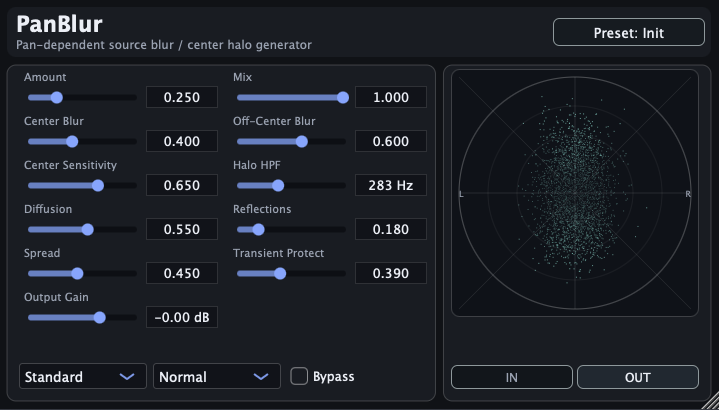
PanBlur
Public download v1.8.0 — bug fixes and stability refinements.
Free Mono / LCR / 5.1 Spatial Enhancer
PanBlur turns mono, LCR, and 5.1 sources into intimate, ASMR-like stereo images while keeping the source position stable. It softens hard point-source panning and adds a clearer Air texture to the generated halo, without moving the dry source position.
The current public macOS installer and Windows VST3 package are v1.8.0. The Windows AAX package remains available separately and has not been version-verified here.
What it does
- Softens the feeling of a mono, LCR, or 5.1 source being locked to one exact pan point.
- Keeps the source around its pan location while giving the image a more blurred, less point-like shape.
- Can give mono, LCR, and 5.1 sources a more intimate, ASMR-like stereo presence while keeping the apparent source position stable.
- Works from a master insert concept, so multiple panned tracks can be softened together instead of inserting a spatial plug-in on every track.
- Designed for cases where ordinary panning feels too narrow or artificial, but full reverb or obvious widening is not the goal.
- Includes an Air control that adds audible movement and texture to the halo layer, creating a clearer sense of air without moving the source position.
Concept
Mono to Intimate Stereo
Give a mono source an ASMR-like stereo presence while keeping its core position clear.
Master Insert
Treat multiple tracks together instead of managing one insert per source.
Air Motion
Add movement and texture to the halo while keeping the dry image and source position stable.
Also try SourceField
If you like using PanBlur to soften point-source panning and add a stable stereo halo, you may also want to try SourceField. SourceField is designed for more direct control over source direction, listener perspective, surface blur, rear softening, air absorption, and proximity bass, while PanBlur remains the simpler way to add a blurred halo around mono or LCR sources.
New in v1.8.0: Bug Fixes
Version 1.8.0 includes bug fixes and stability refinements for the spatial-enhancer workflow.
New in v1.7.0: 5.1 Support
Version 1.7.0 adds 5.1 layout support so PanBlur can be used in more surround-oriented sessions. This has been added to the app, but final confirmation in some 5.1 host environments is still pending.
New in v1.6.0: In-App Tooltips
Version 1.6.0 adds tooltips inside the plug-in, so the main controls and routing behavior are easier to understand while you are working in a session.
New in v1.5.0: LCR Support
Version 1.5.0 adds support for LCR layouts, so PanBlur can be used in sessions that route a center channel alongside left and right. The older mono/mono plug-in format has been removed.
I/O behavior
| I/O | Processing | Bypass / dryOnly |
|---|---|---|
| mono → stereo | Source Pan enabled. L/R = panned source + stereo halo. | Mono is copied to L/R. |
| stereo → stereo | Source Pan disabled. L/R are preserved, with halo added. | L/R pass through unchanged. |
| mono → LCR | C = source core. L/R = halo. | Mono goes to C only. |
| LCR → LCR | L/R are preserved. Halo is generated from C when needed. | L/C/R pass through unchanged. |
| stereo → LCR | L/R = input L/R + halo. C = mid × Center Send, default 0. | L/R pass through unchanged. C is silent. |
| 5.1 layouts | Adds surround-layout handling for 5.1 sessions. | Verification in some 5.1 host environments is still pending. |
Release history
v1.8.0 — bug fixes and stability refinements.
The macOS installer and Windows VST3 package are available from the download links above.
v1.7.0 — 5.1 layout support.
Adds 5.1 support. Final verification in some surround host environments is still pending.
v1.6.0 — In-app tooltips.
Current public download. Adds tooltips for the main controls and I/O behavior.
v1.5.0 — LCR support.
Adds LCR support and removes the mono/mono plug-in format.
v1.4.0 — Clearer SoundField display.
Makes SoundField shape and localization easier to read at small input levels. Windows AAX was also added without changing the plug-in version.
Requirements
- macOS 11 or later for the macOS installer.
- A plug-in host that supports AAX or AU or VST3.
- Current public installer:
PanBlur_1.8.0.pkg - Windows package:
PanBlur-windows-vst3.zip -
Windows AAX package (version not yet refreshed):
PanBlur-windows-aax-signed.zip
Support
Email: kjdevapphelp@gmail.com
Please include: OS version, host app version, and a short description of the issue.