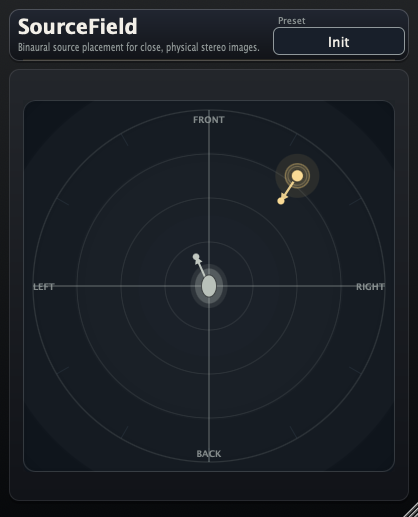
SourceField
Released — Version 1.5.0.
Free 2D ASMR-Style Source Placement Plug-in
SourceField is for playing with close, physical, ASMR-like stereo placement. Put a mono, stereo, or 5.1ch source on a 2D field around the listening point, rotate the source direction, keep the placement as a blurred spatial source instead of a pin-point pan target, add distance-style depth, add subtle motion drift, and use frequency-dependent direction shaping to make rear-facing sounds lose direct high detail without simply turning the whole source down.
SourceField v1.5.0 adds 5.1ch support and updates the spatial model so placement keeps a blurred source image with distance-style depth instead of collapsing the sound into a point source. macOS AU/AAX/VST3 and Windows VST3 builds are available.
What it does
- Places a mono, stereo, or 5.1ch source around a listener-centered XY field.
- Changes left/right position, front/back distance, and source direction in one visual control.
- Lets the listener direction rotate too, so the same source position can feel different as the listening point turns.
- Adds Lock listener to source, so the listener direction automatically follows the current source position.
- Adds Listener always up, keeping the listener direction fixed upward while the source moves around the field.
- Adds Lock direction to listener for keeping the source aimed at the listening point while you move it around the field.
- Includes tone-shaping controls for Surface Blur, Rear Softening, Air Absorption, Proximity Bass, and a Limiter switch.
- Keeps localization as a blurred spatial source rather than reducing placement to a narrow point-source pan.
- Adds Distance Law modes for choosing how strongly distance affects level: Natural, Studio, or Constant.
- Adds subtle Motion Drift controls for a slow, non-LFO-like movement that keeps the source from feeling perfectly static.
- Supports Shift-drag Snap Assist for snapping source movement to clean angle and distance steps while editing the XY field.
- Shows input-reactive directional ripples from the source point, with the visual spread following the source direction.
- Uses frequency-dependent source direction: lows stay comparatively stable, while upper mids, air, consonants, and direct detail react more strongly when the source turns away.
- Combines the kind of spatial softening explored in PanBlur with the front/back placement and distance-color idea of Distance.
- Works as a practical mix tool for making a source feel placed, aimed, or offset without setting up a full surround or game-audio scene.
- Good for ASMR-style play: whisper-close sounds, moving objects, and "where is this voice facing?" experiments.
Demo Video
Watch a short SourceField demo showing voice movement, direction, distance, and spatial blur. Headphones are recommended.
Concept
Source Position
Move the sound on an XY field instead of thinking only in pan or width.
Source Direction
Rotate where the source is facing, changing the feeling of projection and off-axis placement.
Listener Direction
Keep the listener at the center, then turn the listening direction to reshape the perspective.
New in v1.5.0
5.1ch support
SourceField can now be used in 5.1ch sessions, extending the XY placement workflow beyond mono and stereo sources.
Blurred source placement
The spatial image stays softened and source-like instead of becoming a tiny point target, so movement can feel physical without turning into a simple pan-position marker.
Distance-style depth
Distance behavior remains part of the placement model, helping sources feel closer or farther while preserving the blurred spatial character.
New in v1.4.0
Lock listener to source
The listener direction can now automatically follow the current source position, making it easier to keep the listening perspective aimed at the source while editing movement on the XY field.
Listener always up
A new listener mode keeps the listener direction fixed upward, useful when you want the coordinate view to stay stable while moving or automating the source around the listener.
Clearer listener/source workflow
Source-facing and listener-facing behaviors are now separated into explicit lock modes, so you can choose whether the source aims at the listener, the listener aims at the source, or the listener stays fixed.
Improved field readout
The XY field readout has been adjusted for the newer listener-direction modes, making source coordinates and direction values easier to check while editing.
New in v1.3.0
Frequency-dependent direction
Source direction now behaves more like an off-axis voice or small sound source: low body remains present, while upper-mid directness, air, and mouth-front detail fade more strongly as the source turns away.
Core and halo balance
Rear-facing placement is shaped as a balance change instead of a simple volume drop: the direct core becomes less sharp, while the surrounding halo opens slightly so the source feels turned away rather than muted.
Softer consonants
High-frequency transients, breath, sibilance, and close mouth texture are softened more than the low and low-mid body. This helps a voice read as facing away without making it feel thin or artificially low-passed.
Side-facing nuance
Side-facing sources now sit between forward and rear-facing behavior, with a modest reduction around the direct-detail range and a little more spatial spread from the halo.
New in v1.2.0
Distance Law
Choose how distance affects level: Natural for stronger physical distance changes, Studio for a more controlled mix-friendly response, or Constant when you want placement and tone without large level shifts.
Motion Drift
Adds very small slow movement to the source position, designed to feel like air and body movement rather than a left-right pan LFO.
Snap Assist
Hold Shift while dragging in the XY field to snap the source to clean angle and distance steps for more repeatable placement.
Directional visual feedback
The source display now reacts to input level with soft directional ripples that spread more in the direction the source is facing.
Lock direction to listener
Keeps the source direction aimed toward the listener, so moving the source around the XY field still preserves a natural facing direction.
Surface Blur
Softens the hard edge of the source image without simply moving the position or widening the sound in a normal pan-control way.
Rear Softening
Lets rear-facing placement feel less direct, helping front/back movement read more naturally in close-position experiments.
Air Absorption
Adds distance-like high-frequency softening, useful when the source should feel less close or less pointed at the listener.
Proximity Bass
Adds controllable low-end weight for close-source effects, from subtle body to more obvious near-field emphasis.
Limiter
An on/off safety control for keeping close-source and proximity settings easier to audition while experimenting.
Current state
The core interaction, 5.1ch support, blurred source placement, distance-style tone controls, listener lock modes, motion drift, frequency-dependent direction, and visual feedback are now in place. SourceField will keep evolving as a playful spatial tool for close, physical, ASMR-like placement and source-direction experiments.
Release history
v1.5.0 — Adds 5.1ch support and blurred distance-aware placement.
Adds 5.1ch support and updates the spatial behavior so placement remains a blurred source with distance-style depth instead of becoming a narrow point source.
v1.4.0 — Adds listener direction lock modes.
Added Lock listener to source and Listener always up modes, giving clearer control over whether the listener follows the source, stays fixed upward, or uses the normal manually adjustable listener direction.
v1.3.0 — Adds frequency-dependent source direction.
Updates direction processing so rear-facing sounds keep low-end body while direct high detail, air, consonants, and close mouth texture are softened. The result is more like an off-axis source with a wider halo, not a simple full-band volume drop.
v1.2.0 — Adds Distance Law, Motion Drift, Snap Assist, and input-reactive directional visual feedback.
Added Natural / Studio / Constant distance behavior, subtle source motion controls, Shift-drag snapping in the XY field, and softer visual ripples that respond to input level and source direction.
v1.1.0 — Adds Lock direction to listener and new tone controls.
Added Surface Blur, Rear Softening, Air Absorption, Proximity Bass, and Limiter control for more distance-style shaping from the XY field.
v1.0.0 — Initial release.
macOS AU/AAX/VST3 and Windows VST3 builds for testing SourceField's first 2D source-placement workflow.
Requirements
- macOS plug-in host with AU, AAX, or VST3 support.
- Windows plug-in host with VST3 support.
- macOS installer:
SourceField_1.5.0.pkg - Windows package:
SourceField-windows-vst3.zip
Install
-
Download the package for your system:
SourceField_1.5.0.pkgorSourceField-windows-vst3.zip. - Run the macOS installer, or unzip the Windows package.
- Install the plug-in format you need into the appropriate system plug-in folder.
- Launch your DAW and rescan plug-ins if SourceField does not appear.
Support
Email: kjdevapphelp@gmail.com
Please include: OS version, host DAW, plug-in format, SourceField version, and a short description of what you expected to hear or see.