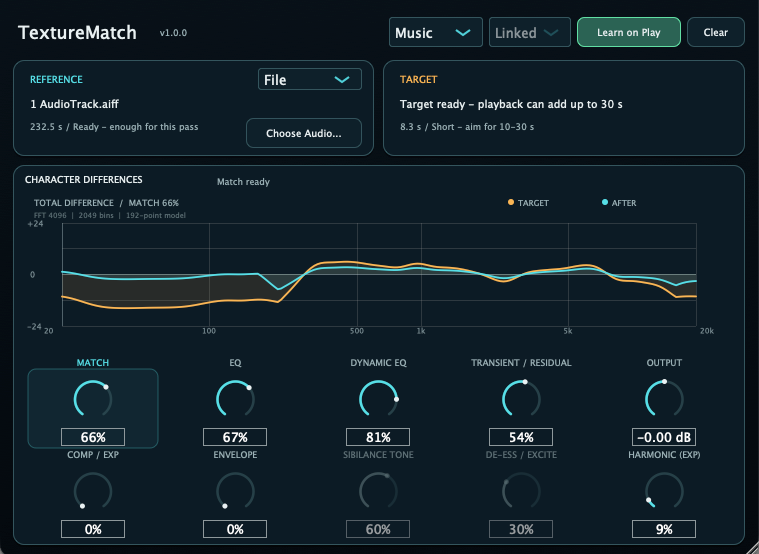
TextureMatch
Version 1.0.0 — Out now.
Reference-Based Character Matching Plug-in
TextureMatch compares a Reference recording with the Target playing in your DAW. Instead of reducing the match to one static EQ curve, it applies separate stages for spectral character, level-dependent tone, transients and residuals, dynamics, envelope, Dialogue-mode sibilance, and experimental harmonic texture.
TextureMatch 1.0.0 is the first release. The macOS installer includes AAX, AU, and VST3; Windows VST3 is provided as a separate ZIP package.
What it does
- Load a Reference recording—the character you want to approach—from a mono or stereo WAV, AIFF, or FLAC file.
- Measure the Target from the audio entering the plug-in while your DAW plays. Target Learn measures the starting sound before correction; it does not memorize a finished result.
- Build a match from several kinds of difference rather than treating every difference as one fixed EQ curve.
- Adjust the amount of each processing stage and judge the result with both the chart and the sound.
Character differences
Spectrum / Dynamic EQ
Spectrum matches static tonal character. Dynamic EQ handles the way that tone changes between quieter and louder parts.
Transient / Residual
Separates attack components from sustained components, then applies component-dependent tone matching instead of one shared correction.
Comp / Exp
Matches level-range behavior with compression or expansion-style processing.
Envelope
Shapes attack and early-decay behavior without reducing the change to EQ alone.
Sibilance Tone
In Dialogue mode, Sibilance Tone and De-ess / Excite match detected sibilant regions. Both stages are bypassed in Music mode.
Harmonic (Exp)
The experimental harmonic-texture stage responds when the Reference has greater harmonic density than the Target.
How to use it
- Choose a Reference file that represents the character you want to approach.
- Play the Target in your DAW. With Learn on Play enabled, measurement follows playback; silence does not add useful learning coverage.
- Start with Match, then balance EQ, Dynamic EQ, Transient / Residual, Comp / Exp, and Envelope as needed.
- Use passages that represent the material, including quieter and louder moments. Recorded duration alone is not a quality score.
Release history
1.0.0 • 2026-09-24 • First release
Introduces Reference-based character matching with separate controls for static and level-dependent spectrum, transients and residuals, dynamics, envelope, Dialogue-mode sibilance, and experimental harmonic texture.
Requirements
- A macOS plug-in host that supports AAX (Pro Tools), AU, or VST3; or a Windows host that supports VST3.
- macOS installer:
TextureMatch_1.0.0.pkg. - Windows package:
TextureMatch-windows-vst3.zip.
The macOS installer includes AAX / AU / VST3. AAX requires an AAX-compatible host.
Install
- Download TextureMatch_1.0.0.pkg, or TextureMatch-windows-vst3.zip.
-
Run the macOS installer, or unzip the Windows package and place
TextureMatch.vst3in a VST3 folder scanned by your DAW. - Launch your DAW and rescan plug-ins if TextureMatch does not appear.
Support
Email: kjdevapphelp@gmail.com
Please include: OS version, host DAW, plug-in format, TextureMatch version, and a short description of what you expected to hear or see.