
Spectral Leveler
Released — Version 1.4.0.
Real-Time Spectral Dynamics for Harshness Control
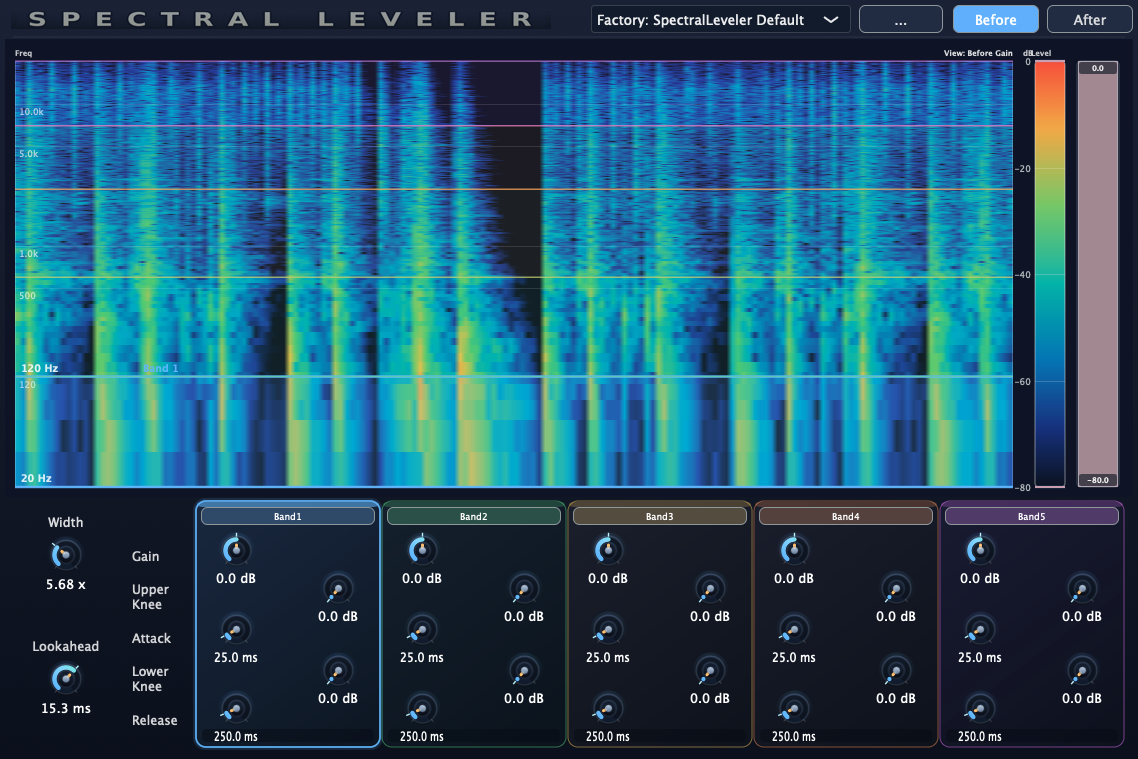
Spectral Leveler is a real-time spectral dynamics plug-in for smoothing harshness and uneven resonances without static EQ. Instead of committing to one fixed EQ curve, you shape audio by frequency window and level window directly on a live spectrogram, then tune Gain, Attack, and Release for smooth, selective leveling. Version 1.4.0 includes minor bug fixes following the previous release.
Latest downloads are available for macOS 11 or later and Windows. The macOS installer and Windows VST3 build match version 1.4.0, and I have received reports that it works well. Version 1.4.0 includes minor bug fixes. The previous update added sidechain and inter-band reduction control. A previous update may resolve an issue where the plug-in could fail to load in some environments, but this has not been fully confirmed yet.
What it does
- Display a real-time spectrogram while audio is playing.
- Set a frequency window (upper / lower bounds) directly in the display.
- Set a level window with the color level bar (target only the desired dB range).
- Apply spectral gain with Attack / Release smoothing for natural control.
- Useful for dialogue harshness, sibilant bands, resonant peaks, and transient-heavy sources.
Status
Current status
- Release: v1.4.0 is now publicly available.
- Latest update: minor bug fixes following the previous release.
- UI: resizable window support from v1.2.0 remains included.
- Formats: AAX / AU / VST3 for macOS 11 or later.
- Focus: Fast day-to-day spectral level control for dialogue, vocals, and instruments.
Future updates and release notes will be posted here.
Release history
v1.4.0 — Minor bug fix update
Current release. Includes minor bug fixes following the previous release.
v1.3.0 — Sidechain and inter-band reduction
Allows reduction to be influenced by other bands and by the sidechain input.
v1.2.1 — Possible loading issue fix
That update may resolve an issue where the plug-in could fail to load in some environments, but this has not been fully confirmed yet.
Typical use cases
Dialogue / VO
Tame harsh consonants and resonant bands in a selected frequency and level range without flattening the entire voice.
Vocals
Smooth bright peaks dynamically while preserving body and tone. Great for “just the painful bits” control.
Instruments
Control string harshness, pick attack spikes, or resonant zones with visual targeting and musical attack / release timing.
De-esser support
Focus on a sibilant frequency window and a high-level dB window to reduce only “S / SH” peaks while leaving the rest of the vocal untouched.
Podcast cleanup
Fast daily cleanup for spoken content: control edgy moments, mouth-noise-heavy bands, or transient spikes without opening a full repair suite.
Mix-bus spot control
Use gentle settings to catch occasional spectral peaks in stems or buses where a normal compressor or static EQ feels too broad.
In practice, Spectral Leveler is designed for the “RX is powerful, but I just want to fix this quickly in the DAW” workflow.
Planned controls
- Frequency window: upper / lower range targeting on the spectrogram.
- Level window: upper / lower dB targeting via color level bar.
- Gain: positive or negative spectral gain within the selected window.
- Attack / Release: smoothing for natural dynamic behavior.
- Before / After view: compare spectrogram response before and after processing.
Requirements
- macOS 11 or later.
- A plug-in host that supports AAX (Pro Tools), AU, or VST3.
- Installer:
SpectralLeveler_1.4.0.pkg
Install
-
Download the latest
SpectralLeveler_1.4.0.pkgfrom this page. - Run the installer (AAX / AU / VST3 will be installed to standard macOS plug-in locations).
- Launch your host and rescan plug-ins if needed.
Support
Email: kjdevapphelp@gmail.com
Please include: OS version, host app / Pro Tools version, and a short description (or screenshot) of the issue.