
QuickSearchExt
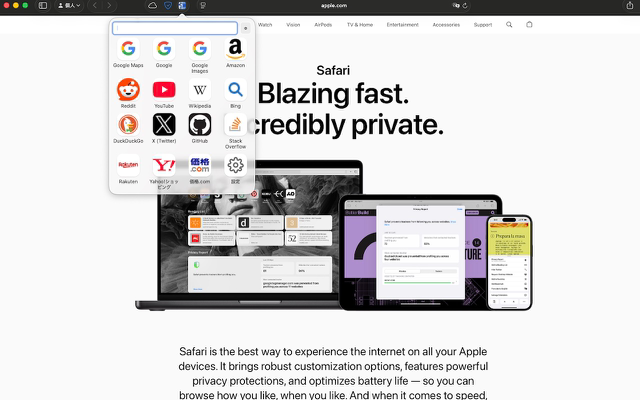
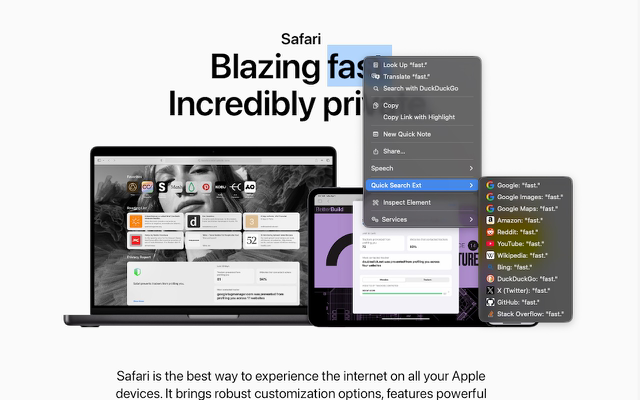
QuickSearchExt is a Safari extension for searching selected text on your favorite sites from iPhone, iPad, or Mac. Use the popup on mobile or the toolbar and right-click menu on Mac for one-tap search.
Quick start
How to use on iPhone / iPad
- Open Safari.
- Tap … → Extensions → launch QuickSearchExt.
- Tap the site you want to search.
Tip: the query auto-fills with selected text. If nothing is selected, it keeps your previous query.
How to use on Mac
- Safari Settings → Extensions → enable QuickSearchExt.
- Click the toolbar button, or right-click selected text → QuickSearchExt.
You can run the same search sites list on both platforms.

Features
- Auto-fill with selected text; if nothing is selected, keep the previous query.
- Built-in sites (examples): Search, Images, Maps, Video, Shopping, Encyclopedia, and more.
- Locale-aware suggestions (enable/disable per site).
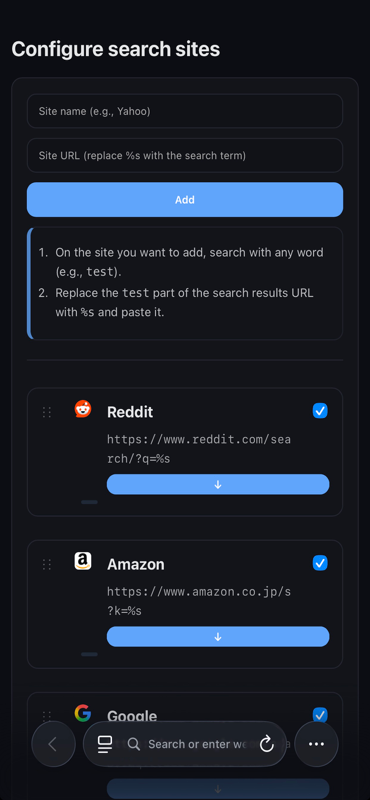
- Reorder, set defaults, and add / edit / delete sites.
- Clear list with site icons.
- Multilingual localization (including Japanese).
Customization
- Freely add a site name and a URL template (use %s for the query).
- Reorder / enable / disable with one click.
Privacy
No personal data is collected. Searches are launched directly from the extension on your device.
For general information, see the site-wide Privacy Policy.
Feedback
Send bug reports or feature requests to kjdevapphelp@gmail.com. Please include: app version, Safari version, macOS/iOS version, and steps to reproduce.