Level Range EQ
Version 2.4.0 — Out now.
Free Level-Dependent EQ Plug-in
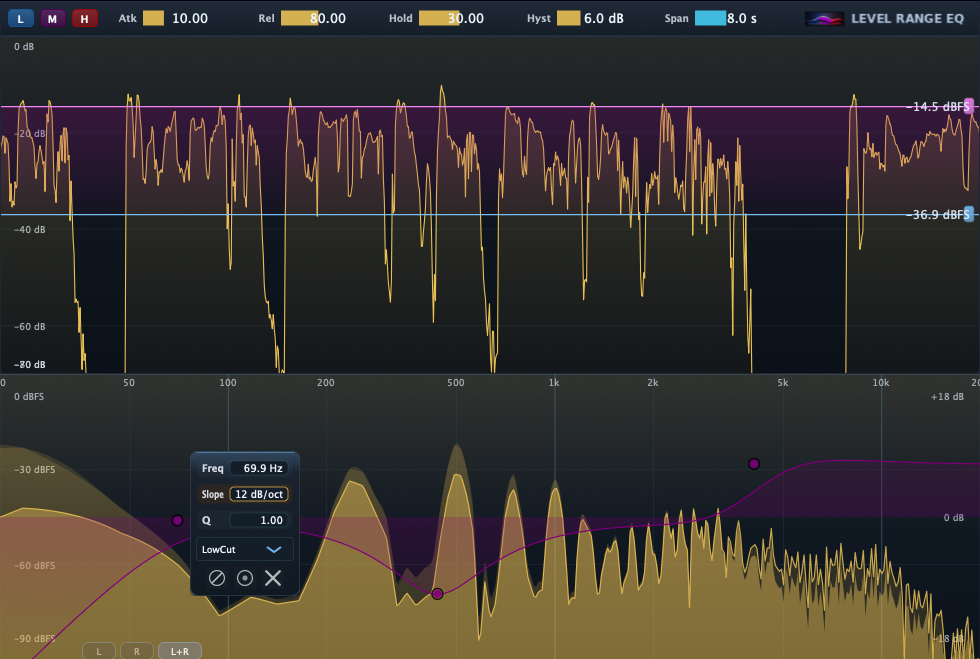
Level Range EQ is a free level-dependent EQ plug-in that applies different EQ curves to quiet, mid-level, and loud parts of a signal. Version 2.4.0 includes minor bug fixes while keeping the Tone Shaper and Dynamic EQ workflows available in the same plug-in.
Latest downloads are available for macOS 11 or later and Windows VST3. The macOS installer is version 2.4.0. The Windows VST3 package currently remains at 2.3.0 until its refreshed build is published, and I have received reports that it works well. Windows AAX support is planned for a future release. Version 2.4.0 includes minor bug fixes. Version 2.0.0 fixed an AU startup issue reported in Logic Pro where inserting the plug-in immediately after launch and moving EQ bands could produce severe distortion, runaway output, and audio dropout until the plug-in was re-instanced.
What it does
- Apply different EQ depending on the signal’s level.
- Three level ranges: Low, Mid, High.
- Each range has its own EQ curve, so you can shape whispers / normal / peaks differently.
What’s new
Version 2.4.0 minor bug fix update
- Minor bug fix update: Level Range EQ 2.4.0 is out now.
- Includes small fixes following the previous release.
- Keeps the existing level-dependent EQ, Tone Shaper, and Dynamic EQ workflows available.
Previous: 2.0.0 fixed an AU startup issue reported in Logic Pro.
Release history
2.4.0 • 2026-08-21 • Minor bug fix update
Current release. Includes minor bug fixes while keeping the existing level-dependent EQ, Tone Shaper, and Dynamic EQ workflows available.
2.2.0 • 2026-06-21 • Bug fix update
Fixed an issue found in the previous release while keeping the existing level-dependent EQ, Tone Shaper, and Dynamic EQ workflows available.
Typical use cases
Vocals
Keep quiet phrases warm, keep normal phrases clear, and tame harsh peaks — without crushing everything into one curve.
Dialogue / VO
Different tonal balance for low-level room tone vs spoken words vs loud consonants — useful for consistent intelligibility.
Instruments
Shape sustain and transients differently (e.g., brighten attacks while keeping body smooth).
Requirements
- macOS 11 or later.
- A plug-in host that supports AAX (Pro Tools), AU, or VST3.
- Installer:
LevelRangeEQ_2.4.0.pkg(download above).
Note: This installer includes AAX / AU / VST3 builds that target macOS 11 or later.
Install
- Download LevelRangeEQ_2.4.0.pkg.
- Run the installer (it installs AAX / AU / VST3 to the standard macOS plug-in locations).
- Launch your host (e.g., Pro Tools for AAX, or any AU/VST3 host) and rescan plug-ins if needed.
Support
Email: kjdevapphelp@gmail.com
Please include: macOS version, Pro Tools version, and a short description (or screenshot) of the issue.