
WeaveGate
Version 1.1.0 — Out now.
Multiband Gate / Spectral Expander
WeaveGate is a multiband gate and spectral expander. Instead of using one detector and one gain stage for the whole signal, it splits the signal into frequency regions, evaluates each region with its own detector, and maps the detector result to gain reduction through editable curves and inter-band dependency rules.
The plug-in can run as a conventional crossover-based multiband processor, or as an FFT spectral engine where frequency bins are assigned to bands and processed directly. The goal is not only to make a signal quieter below a threshold, but to define how frequency regions open, close, influence each other, and transition over time.
Use it to clean up, reshape, or rhythmically organize complex material where different frequency regions should open and close in different ways.
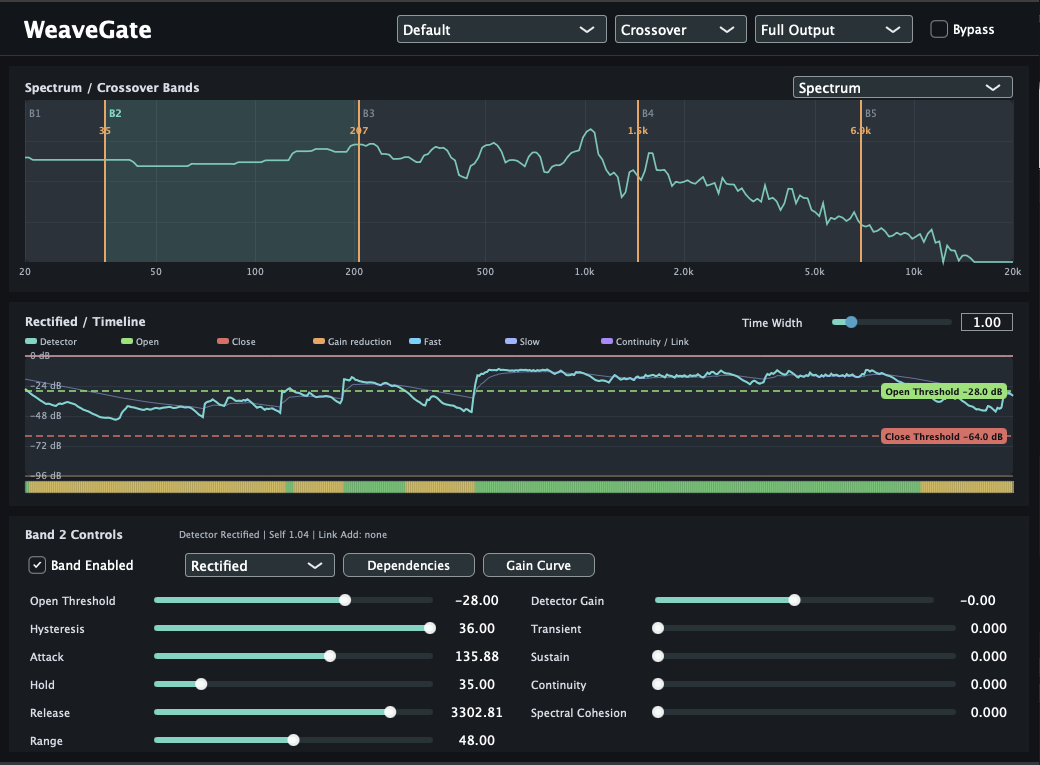
The screenshot below shows the current interface.
What it does
- Splits audio into up to eight frequency bands and applies independent gate / expander behavior per band.
- Lets each band use a selectable detector: Peak, RMS, Rectified, Fast Envelope, or Slow Envelope.
- Maps detector level to gain with an editable gain curve rather than only a fixed hard gate or soft gate preset.
- Allows one band to depend on other bands or sidechain input through link weights and modes such as Add, AND, OR, Follow, Oppose, and Duck.
- Provides two processing engines: low-latency crossover processing and a higher-latency FFT spectral engine.
Processing engines
Crossover mode
Crossover mode uses Linkwitz-Riley-style band splitting and recombines the processed bands in the time domain. It is the lower-latency path and is suited to conventional multiband gating, expansion, monitoring, and threshold editing.
Spectral mode
Spectral mode processes FFT bins directly. It uses a 2048-sample FFT with 50% overlap-add, applies a Hann analysis/synthesis window, assigns bins to the current bands, and gates those bins according to the band's detector and gain mapping. This mode introduces additional latency.
Band model
Band boundaries are editable on the spectrum display. A band owns its threshold, hysteresis, attack, hold, release, range, detector gain, detector mode, dependency settings, and gain-curve points.
Monitoring
The processor exposes views for the full output, selected band, detector signal, opened signal, removed signal, and boundary signal. Timeline data shows detector level, thresholds, gain reduction, fast/slow envelopes, transient score, continuity, and link contribution.
Control areas
Detector layer
- Peak: fast peak-following detector.
- RMS: averaged power detector.
- Rectified: instantaneous rectified level.
- Fast Envelope: responsive envelope follower.
- Slow Envelope: slower, more sustained envelope.
Gate parameters
- Open Threshold: detector level required to open.
- Hysteresis: separation between open and close points.
- Attack / Hold / Release: timing of transitions.
- Range: maximum attenuation applied when closed.
- Detector Gain: trims the detector before gating.
Dependencies
- Self: how strongly the selected band listens to its own detector.
- Sidechain: how much external sidechain contributes to the band's detector.
- Band weights: how much other bands influence the selected band.
- Modes: Add, AND, OR, Follow, Oppose, and Duck define how linked detectors combine.
Gain Curve
- Draws the relationship between normalized detector level and open amount.
- Supports preset shapes such as hard gate, soft gate, expansion, floor preservation, and duck-style curves.
- Allows custom points to create non-linear transitions that are not possible with a simple threshold/range pair.
Adaptive behavior
WeaveGate also tracks transient and continuity information inside each band. These values can influence the effective timing and threshold behavior so a band does not have to respond only to static level. Transient amount, sustain amount, and continuity amount provide a way to bias the gate toward sharper openings, more stable sustained behavior, or smoother release motion.
Spectral Cohesion blends neighboring-band detector information into the decision process. This can make adjacent frequency regions behave more coherently instead of opening and closing as isolated strips.
Screenshot
Release status
- Current release with bug fixes.
- macOS support: AAX / AU / VST3.
- Windows support: VST3.
- The control names, supported formats, screenshots, and workflow may continue to evolve after the initial release.
- The current public-facing direction is a multiband gate and spectral expander focused on band detection, dependency routing, gain mapping, and crossover / FFT spectral processing.
Availability
WeaveGate version 1.1.0 is available for macOS and Windows. The macOS package includes AAX, AU, and VST3 builds. The Windows package is VST3.
Support
Email: kjdevapphelp@gmail.com