Propagation
Released — Version 1.5.0.
Free IR-Inspired Algorithmic Reverb
Propagation is a free IR-inspired algorithmic reverb that turns captured spaces into editable size, density, width, clarity, and motion controls. It uses impulse-response analysis as a starting point, then lets you keep shaping the space inside a mix instead of staying trapped inside one fixed convolution snapshot.
What Propagation is, in one sentence
Propagation analyzes a captured space, then turns it into a playable algorithmic reverb.
If you prefer a simpler mental model, think of it like this: IRs provide the spatial fingerprint, while Propagation gives you playable controls over size, density, width, clarity, and motion.
Propagation 1.5.0 is now publicly available. This update makes small refinements to the reverb controls and refreshes the current public downloads. The controls, layout, and overall direction may continue to change quite a bit in future updates.
What it does
- Start from impulse-response analysis, then keep editing the result like an algorithmic reverb.
- Load your own IRs or use built-in material as a starting point for further shaping.
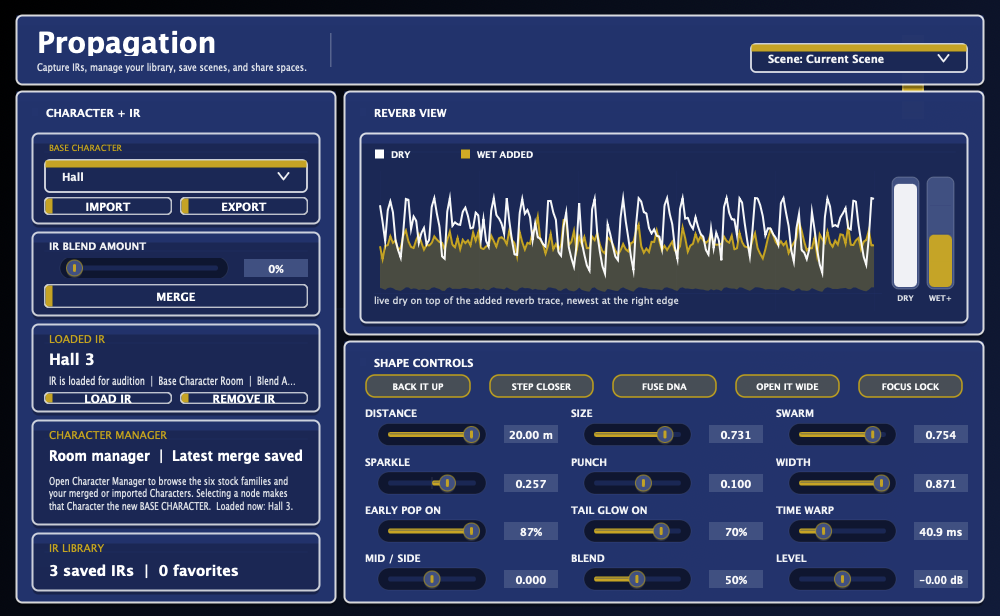
- Adjust familiar mix-facing controls such as Space Size, Density, Clarity, Transient, Width, and M/S Bias.
- Use IR Morph when you want to move away from one literal captured space and toward a new hybrid character.
- Treat the analyzed IR as source material, not as a fixed destination.
A simple way to approach it
Start with Space Size, Density, Clarity, and Width. Those four controls already cover a lot of practical mix work before you go deeper.
What makes it different
The goal is not to replay one static IR forever. The goal is to borrow a space’s character, then let you keep moving it in a musical way.
How to read the controls
Main mix controls
- Space Size: makes the apparent room feel smaller or larger.
- Density: changes how tightly the reflections fill in.
- Clarity: shifts the balance between cleaner detail and thicker wash.
- Transient: changes how sharply the input excites the space.
- Width: adjusts stereo spread and side energy.
- M/S Bias: tilts the wet field toward the center or sides.
IR-based controls
- IR Morph: moves away from one captured response toward a different blended character.
- User IR loading: lets your own spaces become editable starting points.
- Character choices: change the overall reverb behavior rather than acting like fixed presets.
In other words, you do not need to understand every internal concept to use Propagation well. You can treat it like a normal reverb first, then go deeper only when you want to.
New in v1.5.0: Refinements
Version 1.5.0 keeps the same IR-inspired reverb workflow and adds small refinements to the current public builds.
Good first moves
- Pick a character that feels closest to the mix goal.
- Set Space Size first.
- Adjust Density until the reverb feels either more open or more filled-in.
- Use Clarity and Transient to decide how forward or soft the space should feel.
- Only then start pushing IR Morph or loading your own IRs.
Release history
Current release.
- Adds small refinements to the current reverb controls.
- Updates the public macOS and Windows downloads to Propagation 1.5.0.
Previous release.
- Adds small refinements to the current reverb controls.
- Updates the public macOS and Windows downloads to Propagation 1.4.0.
Previous release.
- Adds in-app tooltips for the main reverb controls.
- Updates the public macOS and Windows downloads to Propagation 1.3.0.
Refreshed download release.
- Updates the public macOS and Windows downloads to Propagation 1.2.0.
- Keeps the IR-inspired algorithmic reverb workflow current.
Typical use cases
Mix reverb
Move between tighter and larger spaces without committing to one frozen impulse response.
Creative space shaping
Start from a believable captured space, then push it into something less literal and more musical.
Personal IR starting points
Bring in your own IRs and treat them as editable source material instead of locked destinations.
Requirements
- macOS 11 or later.
- A plug-in host that supports AAX (Pro Tools), AU, or VST3.
- Installer:
Propagation_1.5.0.pkg
Note: The installer includes AAX / AU / VST3 builds for macOS 11 or later. Windows VST3 is provided separately as a ZIP download.
Install
-
Download the latest
Propagation_1.5.0.pkgfrom this page. - Run the installer (it installs AAX / AU / VST3 to the standard macOS plug-in locations).
- Launch your host and rescan plug-ins if needed.
Support
Email: kjdevapphelp@gmail.com
Please include: OS version, host app / Pro Tools version, and a short description (or screenshot) of the issue.