DSPTrace
Beta — Version 1.1.0 available.
Beta AU / VST Plug-in Measurement Host
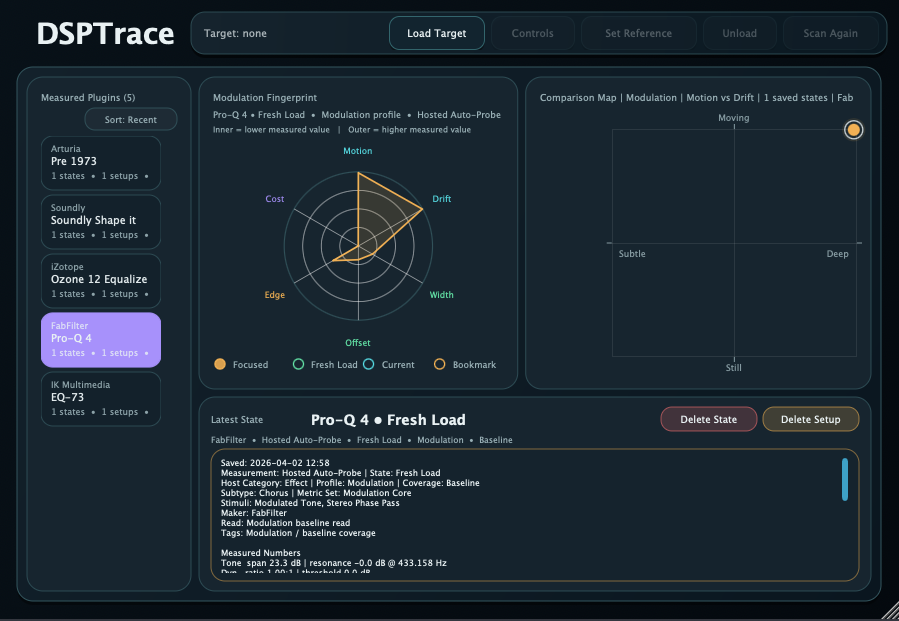
DSPTrace is a beta analysis host for measuring how audio plug-ins behave. The idea is to load a processor, send controlled test signals through it, sweep parameters, capture the result, and turn the response into graphs that are easier to compare than knob labels, marketing names, or listening notes alone.
DSPTrace 1.1.0 beta is available for macOS as an installer package. The Mac build supports AU and VST3 plug-ins only. AAX is not included. The Windows support is VST3 only.
What it aims to do
- Load AU and VST processors inside a controlled analysis host.
- Send repeatable test material through the plug-in: level sweeps, stepped tones, impulses, bursts, noise, or other purpose-built signals.
- Sweep one or more plug-in parameters and record how the output changes.
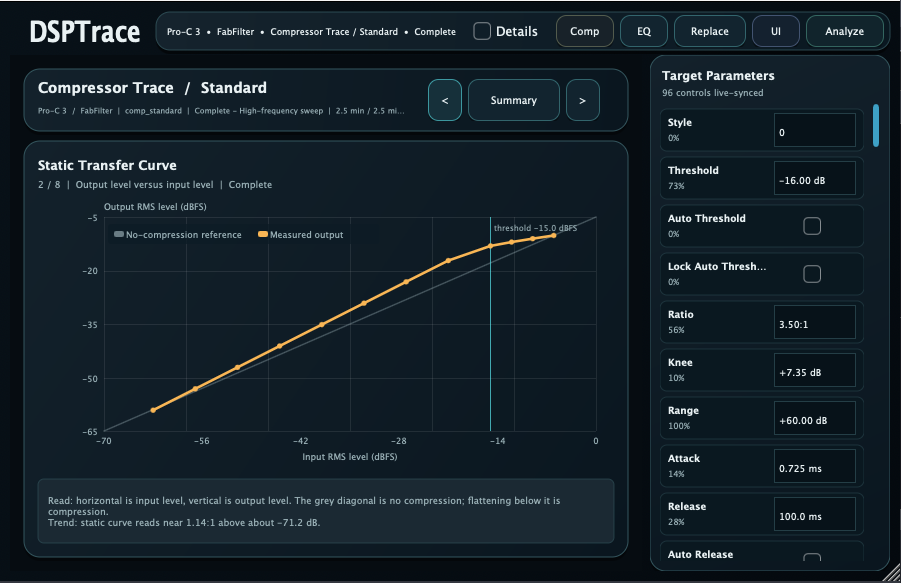
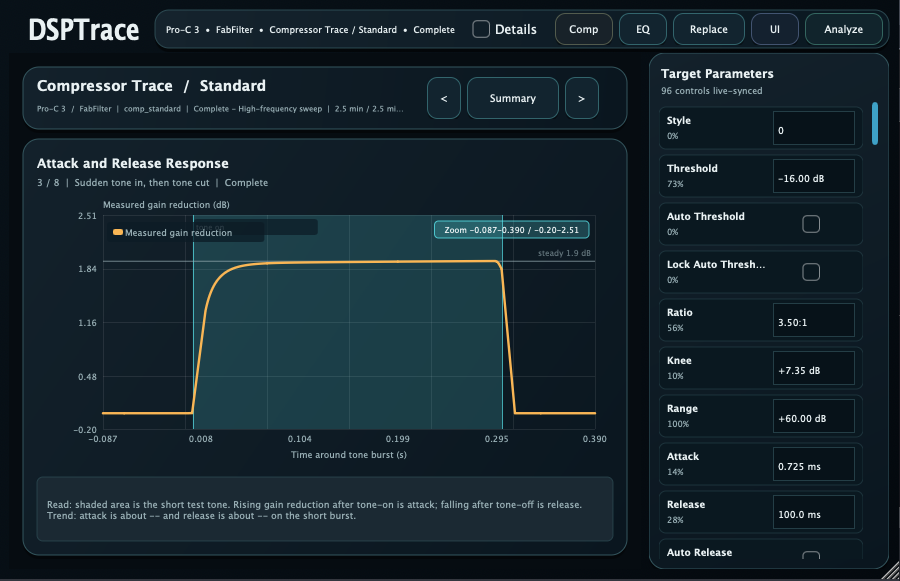
- Convert the captured behavior into graphs such as transfer curves, attack/release traces, frequency response, gain movement, or timing response.
- Keep traces in a library so different plug-ins, versions, settings, or oversampling modes can be compared later.
- Make hidden behavior easier to inspect: auto gain, knee shape, detector timing, saturation onset, internal filtering, and parameter smoothing.
Analysis workflows
Compressor Trace
Compressor Trace is for dynamics processors. It focuses on input/output curves, threshold and knee behavior, ratio shape, makeup gain, attack and release timing, hold behavior, detector smoothing, and whether the plug-in reacts differently to short bursts than to steady-state tones.
EQ Trace
EQ Trace is intended for frequency-shaping processors. It can help show the actual curve behind a band, how Q changes with gain, whether shelves tilt smoothly or create resonant edges, and how dynamic EQ behavior differs between quiet and loud test levels.
Saturation Trace
Saturation and clipping are difficult to describe from controls alone. A trace can show where harmonic content starts, how the transfer curve bends, whether the top and bottom halves behave symmetrically, and how drive, tone, bias, or output trim affect the result.
Version comparison
The same test can be run again after a plug-in update. That makes it easier to see whether a change is only a UI or preset change, or whether the processor itself now has different timing, level, filtering, or nonlinear behavior.
What a trace can reveal
Dynamics details
- Static curve: threshold, ratio, knee, and makeup gain.
- Time response: attack, release, hold, recovery, and overshoot.
- Detector behavior: peak/RMS-like response, smoothing, and level memory.
- Program dependence: different release behavior after short and long events.
Tone and frequency details
- Frequency response: boosts, cuts, shelves, tilt, resonances, and hidden filters.
- Level-dependent tone: curves that change when the input gets louder.
- Phase or timing hints: impulse and burst changes that suggest latency or smearing.
- Oversampling differences: changes in aliasing, rolloff, or high-frequency behavior.
Parameter behavior
- Control scaling: whether the useful range is spread evenly or packed into one end.
- Smoothing: zipper noise prevention, lag, and glide time after automation moves.
- Mode changes: what actually changes when a style, character, or model switch is selected.
- Linked controls: hidden interactions between drive/output, threshold/makeup, or frequency/Q.
Documentation use
- Preset notes: keep measured behavior with the setting that produced it.
- Regression checks: confirm whether a code change altered a processor’s response.
- Teaching material: show students what a compressor, EQ, or saturator is doing visually.
- Mix decisions: choose between processors based on observed behavior, not only names.
How to read it
DSPTrace is not meant to replace listening. It is meant to make listening less vague. If a compressor feels punchy, the trace might show whether that comes from a slower attack, a release overshoot, a curved knee, or a hidden level compensation. If an EQ band feels wider than expected, a trace can show the real curve. If a saturator feels louder even after output trim, the trace can separate level change from harmonic change.
The useful result is a repeatable record: same plug-in, same version, same setting, same test signal, same graph. That makes the tool valuable for plug-in development, QA, documentation, education, and personal research.
Release status
- DSPTrace 1.1.0 beta is available for macOS and Windows VST3.
- Current release includes bug fixes for the beta analyzer workflow.
- macOS support: AU and VST3 only. AAX is not included.
- Windows support: VST3 only. AAX is not included.
- The beta workflow may still change before a stable release.
Availability
DSPTrace 1.1.0 beta is available for macOS as a package installer. The Mac build supports AU and VST3 plug-ins only. AAX is not included. Windows support is VST3 only. AAX is not included on either platform.
Support
Email: kjdevapphelp@gmail.com
If you want to suggest analysis workflows or plug-in types that DSPTrace should handle well, feel free to send them.